The best notch apps for MacBook, sorted by the job you want the notch to do
The best notch apps for MacBook, grouped by job: Dynamic Island panels, a file drop zone, hiding the notch, fun effects and a menu bar manager.
By winterzxzzUpdated 7 min read
The best notch app for your MacBook depends on what you want that black camera cut-out to do. If you want it to act like the iPhone’s Dynamic Island, the strongest picks are NotchNook, Boring Notch, Alcove and our own MacNotch. If you only want somewhere to drop files, NotchDrop does that one thing. If you want the notch gone, TopNotch hides it. And if the real problem is menu bar icons stuck behind it, you want a menu bar manager such as Ice, not a notch app at all.
We make MacNotch, so weigh its entry with that in mind. Every detail about the other apps comes from its official site, App Store listing or GitHub repository as we read them in October 2026; the links are in the Sources section at the end.
The short answer
- Most features in one panel: NotchNook.
- Free and open source: Boring Notch.
- Notifications, reminders and timers in the notch, on any display, for a low one-time price: MacNotch (paid once).
- Lock screen widgets and a polished paid app: Alcove.
- Just a file drop zone with AirDrop: NotchDrop.
- Make the notch disappear: TopNotch.
- Something silly under your cursor: Notchmeister.
- Menu bar icons hidden behind the notch: Ice.
All eight at a glance
| App | Job | Price (October 2026) | Requires |
|---|---|---|---|
| NotchNook | All-in-one panel | US$25 lifetime or US$3/month | macOS 14.6+ |
| Boring Notch | All-in-one panel | Free, GPL-3.0 | macOS 14+ |
| Alcove | All-in-one panel | US$13.99 one-time | macOS 15+ |
| MacNotch | All-in-one panel | One-time purchase | macOS 15+ |
| NotchDrop | File drop zone | Free, MIT | macOS 13+ |
| TopNotch | Hide the notch | Free | macOS 11+ |
| Notchmeister | Cursor effects | Free | macOS 11+ |
| Ice | Menu bar manager | Free, GPL-3.0 | macOS 14+ |
A dash means the requirement was not stated on the page we checked. Prices are the regular ones; NotchNook was running a relaunch discount when we looked.
How we picked
We only included apps with an official home we could read: a vendor site, a Mac App Store listing or a public repository. Each one had to do something specific with the notch, or fix the most common notch annoyance. Apps whose features or prices we could not confirm from the developer were left out.
Dynamic Island apps: the notch as a live panel
These four draw a black island around the camera housing that grows into a panel on hover or a click. They overlap a lot, so here is what sets each one apart. For a deeper side-by-side of the same four, read our NotchNook alternatives comparison.
NotchNook
The best-known notch app, from lo.cafe. Its site lists music controls, a calendar with join buttons for Meet, Zoom, Teams and Webex, notes, to-dos, timers, a camera mirror, your Shortcuts, and a file tray that can hand files to AirDrop. It runs on macOS 14.6 or later on Apple silicon and Intel, one license covers two Macs, and you can try the full app for 48 hours before paying, no card needed. On screens with no notch it shows a slim handle at the top instead.
Pick it if you want the widest feature list and are happy to pay the most of this group.
Boring Notch
A community project from TheBoredTeam on GitHub, GPL-3.0 licensed, with about 11,000 stars in October 2026. Its README checks off music controls with a visualizer, calendar and reminders, a camera mirror, a charging indicator, gesture controls, a shelf with AirDrop and a replacement for the volume, brightness and keyboard backlight HUD. It needs macOS 14 Sonoma or later, on Apple silicon or Intel. Notifications are marked “under consideration” and lock screen widgets are still unchecked.
The build is not notarized because the team has no Apple Developer account yet, so first launch needs a Terminal command or Open Anyway; the Homebrew cask skips that step. Version 2.8 was at release candidate stage when we checked. Pick it if price matters most or you want to read the code. We compare it with ours in MacNotch vs Boring Notch.
Alcove
A paid Dynamic Island app at version 1.7, sold for US$13.99 as a one-time purchase with future updates included. Its site highlights fluid transitions, notifications, Live Activities, swipe gestures, customizable HUDs and lock screen widgets. It needs macOS 15 or later, a license runs on up to three Macs, and there is a 72-hour trial. Its FAQ is candid that it relies on private Apple APIs that could change, and says it collects no data.
Pick it if lock screen widgets or its design are what you are after.
MacNotch
Our app. On a MacBook the island fuses with the hardware notch and opens with a click (or on hover, if you turn that on) without taking keyboard focus from the app you are in. External displays copy the MacBook’s notch, a Mac without a notch gets a floating Dynamic Island at the top of the screen, and you can choose Auto, Notch or Dynamic Island. Inside:
- Now Playing for Spotify, Apple Music and YouTube in the browser, with playback controls.
- Notifications that slide out of the notch, queue up, auto-hide and keep a history.
- A volume and brightness HUD that also shows the output device.
- Meeting alerts with Join and Snooze, and a Today page with your next event and a countdown.
- A Dashboard with day progress, pinned apps and Caffeine, and Quick Toggles for Wi-Fi, Dark Mode and the mic.
- Up to three timers, a Pomodoro and a stopwatch with laps.
- System stats, Notes, To-do from Reminders and an opt-in Clipboard history.
- Mic and camera in-use alerts, plus battery, Low Power Mode, Focus, internet and screen-unlock alerts.
- A file shelf with AirDrop, an AirPods page, a Caps Lock alert, two-finger swipe gestures and a global shortcut.
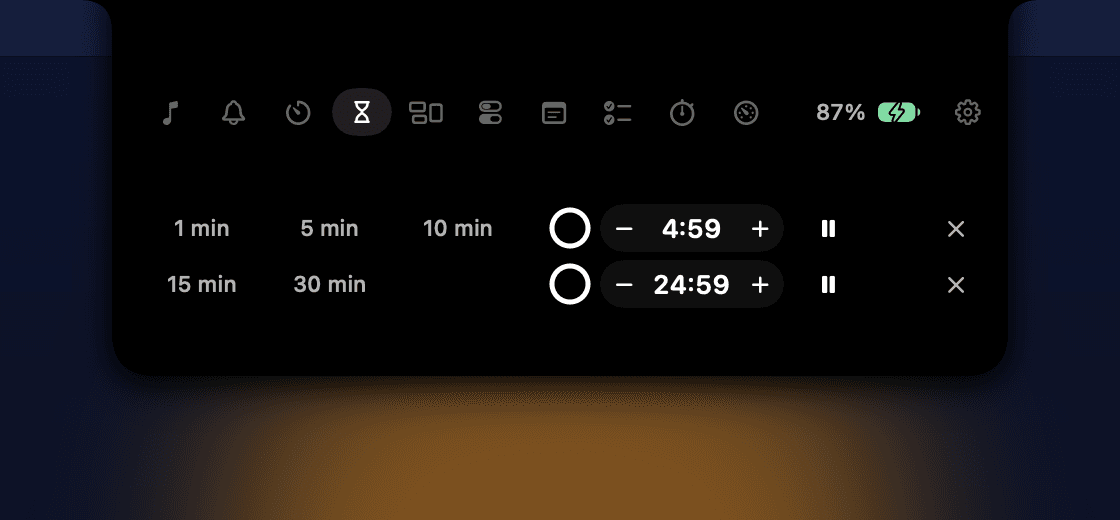
It has no network access and no analytics. The limits: it is at version 1.1.0, needs macOS 15 or later, is not notarized yet (use Open Anyway in System Settings → Privacy & Security on first launch), is not open source, and has no camera mirror or Shortcuts. Pick it if notifications, timers and small everyday pages are what you want from the notch, or you work on a screen without one.
Single-purpose notch apps
NotchDrop: a file drop zone
NotchDrop by Lakr Aream does one job: drag files onto the notch to hold them, then click to open them or send them through AirDrop. Files stay for a day by default, and you can change that. The README says it is built to coexist with menu bar managers. It is free on the Mac App Store for macOS 13 or later and MIT-licensed on GitHub. One thing to know: the App Store version we saw, 2.16, dates from November 2024. Boring Notch credits NotchDrop for the first version of its own shelf.
TopNotch: make the notch disappear
TopNotch, free from MTW (the team behind CleanShot), takes the opposite approach to everything above: its site promises to make the notch disappear, and every feature it lists centres on your wallpaper rather than on drawing anything in the notch. Its site lists support for Dynamic Desktop wallpapers, multiple displays and spaces, an optional rounded-corner effect, and a minimum of macOS 11. If hiding is your goal, our guide on how to hide the notch on a MacBook covers the built-in ways first.
Notchmeister: pure fun
Notchmeister is a free Mac App Store app from The Iconfactory that answers a question nobody needed answered: what happens to the pointer when it slides under the notch? It plays effects such as Glow, Cylon, Plasma Leak and Nano Radar, and it includes a virtual notch for Macs that lack a real one. It will not make you more productive, and it does not pretend to.
The companion: a menu bar manager
When the menu bar has more icons than fit beside the notch, macOS hides the overflow. No notch app above fixes that. Ice does: it is a free, GPL-3.0 menu bar manager for macOS 14 or later that can hide icons you rarely use and show hidden ones in a separate bar, which its README suggests for MacBooks with a notch. The README also notes it is still in active development. We cover this problem, and paid options, in what to do with the MacBook notch.
Which notch apps work together?
Pick one Dynamic Island app: NotchNook, Boring Notch, Alcove and MacNotch all claim the same space around the camera. A menu bar manager works on a different layer, so Ice sits happily beside any of them. TopNotch pulls the other way, but a black-topped wallpaper also makes a black island look like part of the bezel.
Who should pick which
- On macOS 14 Sonoma: NotchNook (14.6+) or Boring Notch.
- On an external display or a Mac with no notch: NotchNook or MacNotch, which both document it.
- No budget at all: Boring Notch, plus NotchDrop if you only need the shelf.
- A camera mirror and Shortcuts: NotchNook.
- Notifications, timers, system stats, a clipboard history and mic or camera alerts for a one-time price: MacNotch.
- Lock screen widgets: Alcove.
- You never wanted a notch in the first place: TopNotch.
More guides live in the Notch & Dynamic Island category, including how to get a Dynamic Island on a Mac. For everything MacNotch does, see the MacNotch Dynamic Island app for Mac.
Sources
- NotchNook official site and FAQ: getnotchnook.com
- Boring Notch repository and README: github.com/TheBoredTeam/boring.notch
- Boring Notch releases: github.com/TheBoredTeam/boring.notch/releases
- Alcove official site: tryalcove.com and FAQ: tryalcove.com/faqs
- NotchDrop repository: github.com/Lakr233/NotchDrop and Mac App Store listing: apps.apple.com/us/app/notchdrop
- TopNotch official site: topnotch.app
- Notchmeister on the Mac App Store: apps.apple.com/us/app/notchmeister
- Ice repository and README: github.com/jordanbaird/Ice
More on this topic: Notch & Dynamic Island guides · MacNotch
 Notch & Dynamic Island