MacNotch vs Boring Notch: which notch app should you use?
MacNotch vs Boring Notch compared: price, open source, macOS version, Macs without a notch, notifications, shelf and HUD. Who should pick which.
By winterzxzzUpdated 5 min read
Boring Notch and MacNotch both turn the MacBook notch into a Dynamic Island-style panel for music, your calendar, files and the volume and brightness HUD. They differ in the ways that decide which one you should install: one is free and open source, the other is a paid one-time purchase; one supports macOS 14, the other needs macOS 15; and each has features the other does not.
We make MacNotch. Boring Notch details below are as listed in its official GitHub README and release notes in October 2026 (links at the end). Where something was not stated there, the table says so rather than guessing.
The verdict in one paragraph
Pick Boring Notch if you want a free, open-source app, you are on macOS 14, or you want a camera mirror. Pick MacNotch if you want notifications, timers, a Pomodoro, a panel of everyday pages and mic or camera alerts in the notch, you use a Mac or external display without a notch, and a one-time purchase is fine.
Feature comparison
| MacNotch | Boring Notch | |
|---|---|---|
| Price | One-time purchase | Free (donations via Ko-fi) |
| Source code | Not public | Open source, GPL-3.0 |
| Requires | macOS 15 or later | macOS 14 Sonoma or later; Apple silicon or Intel |
| Mac or display without a notch | Yes — external displays copy the MacBook notch, a Mac without one gets a floating Dynamic Island; choose Auto, Notch or Dynamic Island | Not documented in the README; 2.8 pre-release adds a setting for the notch to follow the active display |
| Notarized by Apple | No (Open Anyway in Privacy & Security on first launch) | No (Terminal command, Open Anyway, or Homebrew) |
| Install | DMG or ZIP from the link in your receipt email | DMG from GitHub, or Homebrew cask |
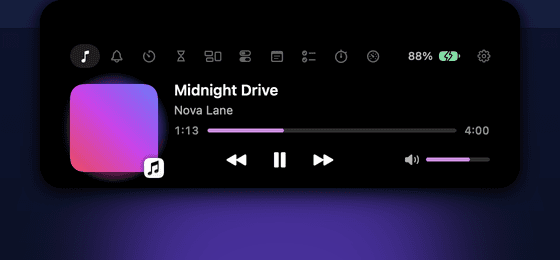
| Now Playing | Yes — artwork, waveform, controls, output-volume slider | Yes — music controls with a visualizer |
| Volume and brightness HUD | Yes, plus output device | Yes, a full HUD replacement |
| Calendar | Yes — next event with a countdown | Yes |
| Reminders | Yes — a To-do page from Reminders | Yes (checked off in the README) |
| Notifications in the notch | Yes, with history | Not listed |
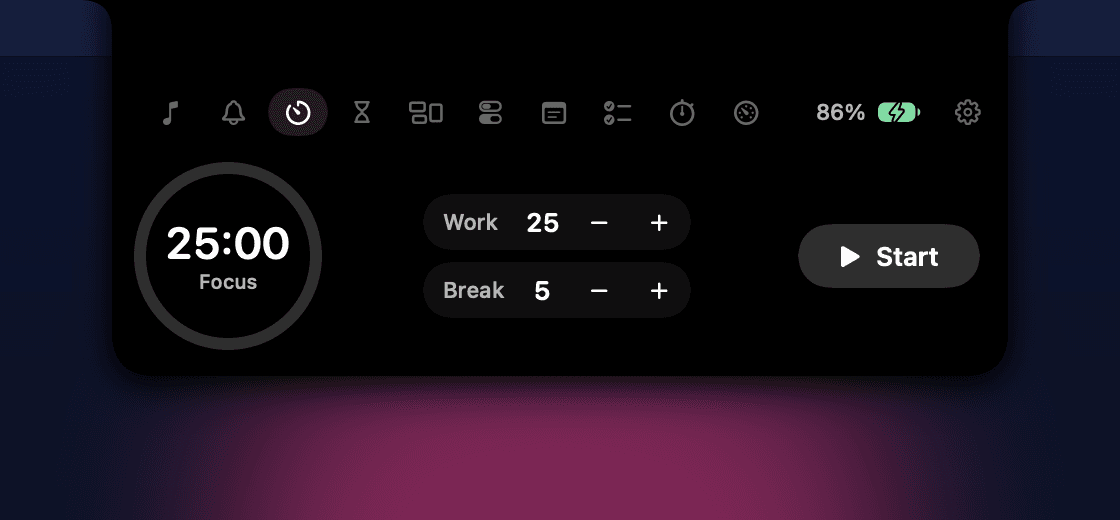
| Timers and Pomodoro | Yes — up to three timers, a Pomodoro and a stopwatch | Not listed |
| File shelf | Yes, with AirDrop | Yes, with AirDrop |
| Mic and camera in-use alerts | Yes | Not listed |
| Battery | Battery, charging and Low Power Mode alerts | More battery detail in the 2.8 pre-release notes |
| Webcam mirror | No | Yes (README); more camera options in the 2.8 pre-release notes |
| Gestures and shortcut | Two-finger swipes; global shortcut | Not listed |
| Network and analytics | No network, no analytics | Not stated (the code is public to check) |
“Not listed” means the feature is not in Boring Notch’s README feature list or the release notes we read. Boring Notch moves quickly — its 2.8 builds were still pre-releases in October 2026, with 2.7.3 marked as the latest stable release — so check its repository for anything that matters to you.
Price and licensing
Boring Notch costs nothing. It is GPL-3.0 open source with around 11,000 stars on GitHub, and the project accepts donations. If a free app that you can audit or build yourself is the priority, that is a real advantage MacNotch does not match: MacNotch is a closed-source, one-time purchase. What you get for that is a small, focused app with no subscription, no account needed to use it, no network access and no analytics.
Compatibility
This is often the deciding row. Boring Notch supports macOS 14 Sonoma and later on Apple silicon and Intel Macs. MacNotch needs macOS 15 or later, so on Sonoma, Boring Notch wins by default.
Screens without a notch are the other way round. MacNotch is designed for any Mac: on a MacBook the island fuses with the hardware notch, external displays copy that notch so the island looks the same on every screen, and a Mac without one gets a floating Dynamic Island at the top of the screen. Boring Notch’s README focuses on the MacBook notch; its 2.8 pre-release notes mention handling of non-notch heights and a setting to follow the active display, so support is evolving there. Our guide to a Dynamic Island on Mac covers how this works on external displays.
Features: where each one is ahead
Boring Notch is ahead on
- Camera mirror. Its README lists a mirror as shipped, and recent pre-release notes add camera selection and a mirrored or natural view. MacNotch has no mirror.
- Lock screen. Its 2.7 release notes say the notch appears on the lock screen.
MacNotch is ahead on
- Notifications. New notifications slide out of the notch, auto-hide, queue up and keep a history; click one to open its app.
- Timers. Up to three quick timers, a Pomodoro and a stopwatch with laps, next to your next event with a countdown and a To-do page from Reminders (Boring Notch now lists reminders too).
- Live alerts. Mic and camera in use, battery and charging, Low Power Mode, Focus changes, internet lost or back, and screen unlock, each of which can be turned off. There is also an AirPods page and a Caps Lock alert.
- Gestures. Two-finger swipe down to open, up to close, left and right to skip tracks.
- More pages in the panel. A Dashboard with pinned apps and Caffeine, Quick Toggles, System stats, Notes and an opt-in Clipboard history, each of which you can switch off.
Both do well
Now Playing with playback controls, a replacement for the volume and brightness HUD, a calendar view and a file shelf with AirDrop are in both. MacNotch’s Now Playing covers Spotify, Apple Music and YouTube in the browser, and its brightness HUD works without the Accessibility permission.
Installing and trusting each app
Neither app is notarized by Apple, so macOS warns on first launch either way. Boring Notch’s README says the team does not have an Apple Developer account yet; it recommends xattr -dr com.apple.quarantine "/Applications/Boring Notch.app", mentions Open Anyway in Privacy & Security, and offers a Homebrew cask (brew install --cask TheBoredTeam/boring-notch/boring-notch) that skips the warning. For MacNotch 1.1.0 it’s the same: try to open it, then use Open Anyway, or run xattr -dr com.apple.quarantine /Applications/MacNotch.app.
On trust, the trade-off is straightforward. With Boring Notch you can read the source. With MacNotch you are trusting a small developer’s closed binary, downloaded from its official page, that states it makes no network connections and collects no analytics.
Who should pick which
Choose Boring Notch if
- you want a free app, or you only use open-source utilities;
- you are on macOS 14 Sonoma;
- you want a camera mirror;
- you like installing and updating through Homebrew.
Choose MacNotch if
- you want notifications, timers, a Pomodoro, system stats and a clipboard history in the notch;
- you work on an external monitor or a Mac without a notch;
- you want mic and camera alerts right next to the camera;
- you are on macOS 15 or later and a one-time purchase is fine.
If neither fits, NotchNook and Alcove are the paid alternatives; we compare all four in NotchNook alternatives. And if what bothers you is menu bar icons hidden behind the notch, neither app fixes that; see what to do with the MacBook notch. More notch guides are in the Notch & Dynamic Island category.
Sources
- Boring Notch repository and README: github.com/TheBoredTeam/boring.notch
- Boring Notch releases: github.com/TheBoredTeam/boring.notch/releases
More on this topic: Notch & Dynamic Island guides · MacNotch
 Notch & Dynamic Island