MacTemp vs TG Pro: Mac temperature and fan apps compared
MacTemp vs TG Pro on sensors, fan control, safety, alerts, history, Mac support and price — including the many cases where TG Pro is the better pick today.
By winterzxzzUpdated 6 min read
TG Pro and MacTemp do the same core job: show your Mac’s temperatures and fan speeds, and let you cool it harder when you want to. TG Pro is the established option, with support stretching from macOS 10.14 to macOS 27 on Intel and Apple Silicon. MacTemp, which we make, is a newer app for Apple Silicon Macs that adds in-app history charts, a custom fan curve and a very detailed sensor view. Here is a side-by-side look, including where TG Pro is clearly ahead.
The short answer
- Choose TG Pro if you need something you can buy and install today, have an Intel Mac or an older macOS, want SMART temperatures for external drives, or manage several Macs and need remote deployment.
- Choose MacTemp if you have an Apple Silicon Mac on macOS 14 or later and want history charts in the app and a custom temperature-to-speed curve.
Feature comparison
TG Pro details are as listed on tunabellysoftware.com/tgpro in October 2026 (version 2.104). MacTemp details come from its product page. A dash means the vendor’s page doesn’t document it.
| Feature | MacTemp | TG Pro |
|---|---|---|
| Price | One-time purchase | $10, one-time; up to 3 Macs for personal use |
| Platform | macOS 14+, Apple Silicon | macOS 10.14 to 27, Intel and Apple Silicon |
| Sensors | SMC, IOHID and battery gauge; ~250 on an M1 Pro, grouped by sensor family, raw keys shown | CPU (incl. individual cores on Apple Silicon), GPU, drives, battery, memory, power, Thunderbolt ports |
| Drive temperatures | Internal SSD | Internal and external drives via SMART |
| Fan modes | System, Auto Boost, Rules, Custom Curve, Manual, Maximum | Auto Boost rules, Manual, Max |
| Rules by power source | Yes (adapter or battery) | Yes (separate battery and power adapter Auto Boost settings) |
| Menu bar | Six styles; any mix of CPU, GPU, a sensor, fan RPM, power | Temperatures and fan speeds, with controls in the dropdown |
| History | Charts up to 48 h in the app; CSV logging | CSV logging |
| Alerts | Notification, sound, email (SMTPS; email untested in beta) | Notification, sound, email |
| Diagnostics | Sensors, fans, battery health, power, uptime, support package | Fans, sensors, battery health, last shutdown or sleep |
| Remote deployment | — | Command-line options for silent installs and settings |
| Analytics | None; no network unless email alerts are on | No tracking or analytics code |
Sensors: breadth vs detail
TG Pro covers a wide range of hardware: CPU temperatures including individual cores on Apple Silicon, GPU, battery, memory, power and Thunderbolt ports, plus internal and external SSDs and hard drives through SMART. It shows the current reading and the highest value recorded for each sensor.
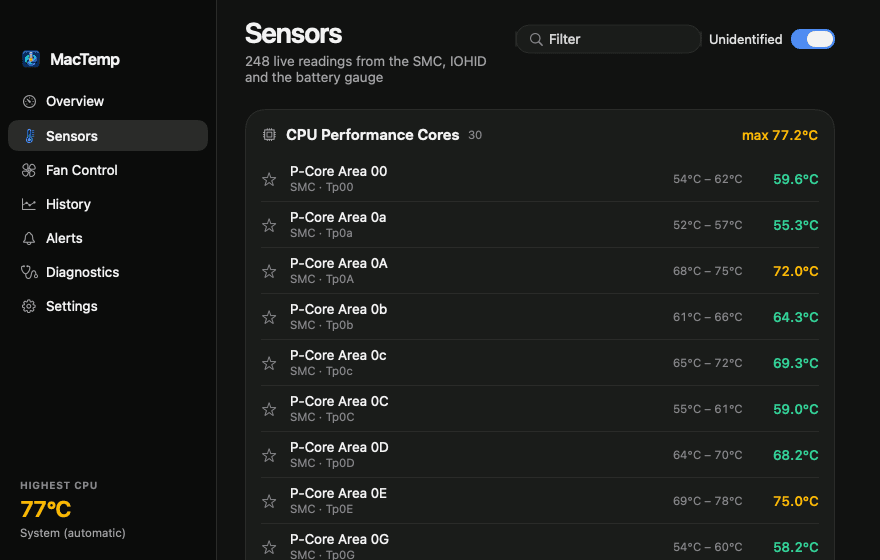
MacTemp goes deep on Apple Silicon instead. It reads the SMC, the IOHID temperature sensors and the battery gauge — around 250 readings on a MacBook Pro with M1 Pro — and groups them by sensor family (CPU performance and efficiency areas, best effort), GPU, SoC, memory, storage, battery, wireless and enclosure. Sensors whose meaning Apple doesn’t document keep their raw key instead of a guessed name, and the Sensors page shows the range each one has covered this session. It reads the internal SSD but not SMART data from external drives.
Fan control and safety
Both apps offer rule-based automatic cooling (Auto Boost in both), manual speeds and a maximum setting, and both do the writing through a separate component — TG Pro describes a dedicated service that handles fan adjustments and checks that commands come from TG Pro. TG Pro notes that manual and Max options depend on your Mac model and settings.
MacTemp adds two modes: Rules, where each rule names a sensor, a threshold, a fan and a speed and can apply only on the adapter or only on battery, and Custom Curve, where speed follows a curve you draw. Auto Boost, Rules and Custom Curve never request less than macOS was asking for at the moment MacTemp took over. They don’t follow later increases from macOS, so a curve or rule set low can run the fans slower than macOS would under heavier load; the safety limit (95 °C by default on any CPU, GPU or SoC sensor) is the backstop and sends all fans to maximum. Every request is clamped to the fan’s own range. Fan control stays off until you install and approve the helper; without it MacTemp is a monitor. Fan writes have so far been verified on a MacBook Pro with M1 Pro; see is it safe to control your Mac’s fans? for what has and hasn’t been tested.
Whichever you use, run only one of them in a fan-controlling mode at a time.
Alerts, history and diagnostics
Both send macOS notifications, sounds and email alerts, both log to CSV, and both run diagnostics that cover fans, sensors and battery health. TG Pro’s notifications can also flag unusual shutdowns and diagnostic results, and its email alerts include system information. MacTemp’s alerts cover temperature limits, battery health, a fan not reaching its target, rising thermal pressure and, where macOS records a shutdown cause, an abnormal shutdown. MacTemp sends email through your own mail server (SMTPS); email alerts haven’t been sent in testing yet. The clearer difference is history: MacTemp keeps up to 48 hours in memory and charts CPU, GPU, SoC, SSD, battery, power and fans in the app, while TG Pro’s page describes CSV logs for later review.
Maturity, Mac support and price
This is where TG Pro wins outright today. It supports macOS 10.14 through macOS 27 on Intel and Apple Silicon, including Intel Macs with the T2 chip, publishes a long list of supported models, is notarized by Apple, can be installed with Homebrew, and offers command-line options for remote deployment. It’s listed at $10 as a one-time payment, and a personal license covers up to three Macs.
MacTemp needs macOS 14 or later on Apple Silicon: verified on a MacBook Pro with M1 Pro, with other Apple Silicon models expected to work but untested. It is a one-time purchase with no account and no subscription. MacTemp is an independent app and isn’t affiliated with Tunabelly Software.
Who should pick which
- Anyone who needs a fan app today: TG Pro.
- Intel Macs or macOS 13 and earlier: TG Pro.
- External drive temperatures via SMART, or managing a fleet: TG Pro.
- Apple Silicon owners who want history charts and a custom curve: MacTemp.
Still comparing? The best Mac temperature monitor apps adds Stats, iStat Menus and Macs Fan Control, and MacTemp vs Macs Fan Control covers the free option. The full feature list is on the MacTemp page, and more guides are in the Mac temperature and fans category.
Sources
- tunabellysoftware.com/tgpro (features, requirements, price, license terms, security)
- MacTemp product page and Winter Labs FAQ (features, requirements, safety limits, availability)
More on this topic: Temperature & fans guides · MacTemp
 Temperature & fans