The best Mac temperature monitor apps, compared
Free and paid apps to check your MacBook temperature: Stats, iStat Menus, TG Pro, Macs Fan Control and MacTemp compared on sensors, fans and price.
By winterzxzzUpdated 6 min read
If you just want to see temperatures for free, Stats is the obvious first try. If you want a polished all-round system monitor with temperatures and fan control in one app, iStat Menus is the long-standing choice. If temperatures and fans are the whole point, TG Pro and Macs Fan Control are the established specialists, and TG Pro also runs on older Macs and Intel models. MacTemp, which we make, is a newer specialist for Apple Silicon: sensor detail, history, alerts and optional fan control in one native app. Below we say where the others are the safer pick today.
First: what macOS shows on its own
macOS has no temperature readout. Activity Monitor shows CPU load and energy impact, which is often enough to find the cause of a hot Mac, and on Apple Silicon the Terminal tool powermetrics reports thermal pressure rather than degrees. Our guide to checking your Mac’s CPU temperature covers both. Everything below is a third-party app; as Apple points out, these read internal sensors rather than the case, and Apple says not to use them to diagnose hardware problems.
At a glance
Competitor details are as listed on each vendor’s own website in October 2026. “Not documented” means the vendor’s page doesn’t mention it.
| MacTemp | Stats | iStat Menus | TG Pro | Macs Fan Control | |
|---|---|---|---|---|---|
| Price | One-time purchase | Free, open source (MIT) | 14-day trial, then a paid license; or Setapp at US$9.99/month | $10, one-time | Free download; Pro license is one-time, per computer |
| Requirements | macOS 14+, Apple Silicon | macOS 12+, Apple Silicon and Intel | macOS 13.5+ | macOS 10.14 to 27, Intel and Apple Silicon | Intel and Apple Silicon |
| Temperatures | Yes, grouped by sensor family, with raw sensor keys | Yes, in the Sensors module | Yes, in the Sensors menu | Yes, incl. individual CPU cores on Apple Silicon | Yes |
| Drive temperatures | Internal SSD | Not documented | Where supported | Internal and external drives via SMART | Third-party HDD/SSD via S.M.A.R.T. |
| Fan control | Optional: six modes, via a helper you approve | Not documented (fan speeds shown as readings) | Yes, incl. ramping on temperature and battery state | Auto Boost rules, Manual, Max | Fixed RPM or sensor-based; presets with Pro |
| Alerts | Notification, sound or email (SMTPS; email untested in beta) | Not documented | Rules for sensors, CPU, battery and more | Notifications, sound and email | Not documented |
| History | Charts up to 48 h; CSV logging | Menu bar graphs (e.g. CPU, network) | Graphs for CPU, memory and network | CSV logging | Not documented |
| Other system stats | Power, battery health, diagnostics | CPU, GPU, RAM, disk, network, battery, Bluetooth, clock | CPU, GPU, memory, disks, network, battery, weather, clocks | Battery health, diagnostics, last shutdown | Not documented |
Stats: the free menu bar monitor
Stats is a free, open-source system monitor that lives in the menu bar. Its site lists nine modules — CPU, GPU, RAM, disk, sensors, network, battery, Bluetooth and a clock — and the Sensors module reads temperature, voltage, power and fan speed. It needs macOS 12 or later and runs on Apple Silicon and Intel. Its site doesn’t describe fan control, so think of it as a monitor. Pick it if you want temperatures next to CPU and network graphs at no cost.
iStat Menus: the all-round system monitor
iStat Menus 7.5 (macOS 13.5 or later) covers far more than temperatures: CPU and GPU, memory, disks, network, battery and power, weather and clocks, each as its own menu bar item or combined. Its Sensors menu lists temperatures, drive temperatures where supported, fans, frequencies, voltages, current and power, and Bjango says fan speeds can be controlled and switched or ramped based on temperatures and battery state. Rules notify you about a wide range of events. There’s a 14-day trial, single and family licenses, and Setapp access at US$9.99 a month. Pick it if you want one polished app for every system stat, temperatures included.
TG Pro: the established temperature and fan specialist
TG Pro 2.104 focuses on temperatures and fans. It shows CPU (including individual cores on Apple Silicon), GPU, drives through SMART, battery temperature, health and cycle count, memory, power and Thunderbolt ports, with the highest value recorded for each sensor. Fan control includes Auto Boost rules, manual speeds and Max; diagnostics cover fans, sensors, battery health and the last shutdown; alerts arrive as notifications, sounds or email, and it logs to CSV. It supports macOS 10.14 to macOS 27 on Intel and Apple Silicon, is notarized by Apple, and is listed at $10 as a one-time payment, with one license covering up to three Macs for personal use. Pick it if you want a mature fan and temperature tool, need SMART data for external drives, or have an Intel or older Mac. Our MacTemp vs TG Pro comparison goes deeper.
Macs Fan Control: simple fan control, free to start
Macs Fan Control shows fan speeds and temperatures, including third-party drives through S.M.A.R.T., and lets you set a fixed RPM or tie a fan to a temperature sensor. When every fan is left on Auto, it works as a monitor only. The download is free; the Pro license, a one-time purchase per computer, adds custom fan presets and priority support. It runs on Intel and Apple Silicon, and on Intel Macs it can also control fans in Windows installed with Boot Camp. Pick it if you want straightforward fan control and don’t need alerts or history. See MacTemp vs Macs Fan Control for the head-to-head.
MacTemp: sensor detail, history and safe fan control for Apple Silicon
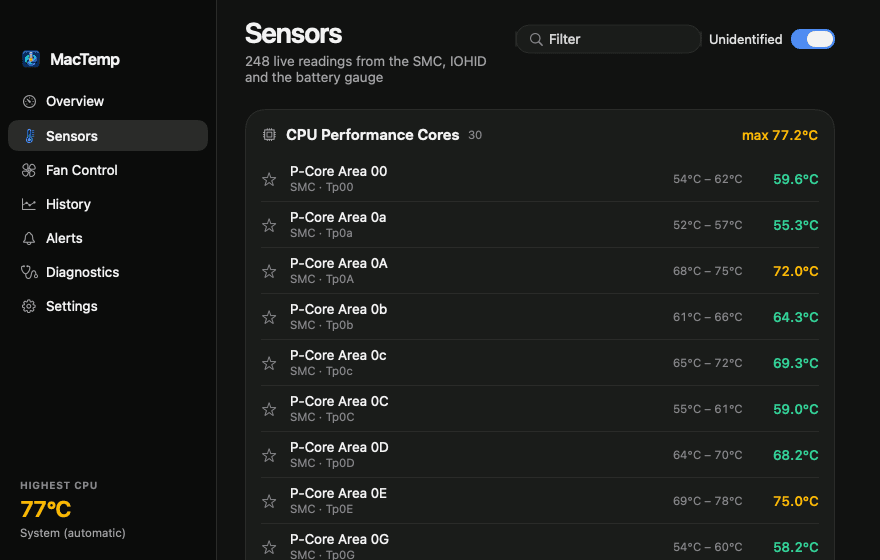
MacTemp is our app, built for Apple Silicon Macs on macOS 14 or later. It reads around 250 sensors on a MacBook Pro with M1 Pro from the SMC, the IOHID temperature sensors and the battery gauge, grouped by sensor family (CPU performance and efficiency areas, best effort), GPU, SoC, memory, storage, battery, wireless and enclosure, and it shows each fan’s current, minimum, maximum and system target speed. History is kept for up to 48 hours with charts; alerts cover temperatures, battery health, fans, thermal pressure and, where macOS records a shutdown cause, abnormal shutdowns, by notification, sound or email through your own mail server (SMTPS — email is a beta feature not yet sent in testing); and a diagnostics page checks sensors, fans and battery. Monitoring needs no permissions.
Fan control is optional and goes through a small helper you approve in System Settings. It has six modes — System, Auto Boost, Rules, Custom Curve, Manual and Maximum — and clamps every request to the fan’s own range. Auto Boost, Rules and Custom Curve never ask for less than macOS was at the moment MacTemp took over, but they don’t follow later increases from macOS, so a low curve or rule can run the fans slower than macOS would under heavier load; the 95 °C safety limit is the backstop. The honest caveats: it has been verified on a MacBook Pro with M1 Pro so far, it doesn’t read SMART data from external drives, and Intel Macs aren’t supported. Pick it if you have an Apple Silicon Mac and want sensor detail, history and alerts with careful fan control in one app.
Which one should you use?
- Free, just the numbers: Stats.
- Every system stat in one place: iStat Menus.
- Intel Mac, older macOS, or external drives over SMART: TG Pro.
- Basic fan control for free: Macs Fan Control.
- Apple Silicon, sensor detail, history and alerts in one app: MacTemp.
Whatever you choose, run only one app that controls fans at a time. Before you hand your fans to any of them, read is it safe to control your Mac’s fans?. More guides are in the Mac temperature and fans category.
Sources
- Stats: mac-stats.com
- iStat Menus: bjango.com/mac/istatmenus
- TG Pro: tunabellysoftware.com/tgpro
- Macs Fan Control: crystalidea.com/macs-fan-control and crystalidea.com/macs-fan-control/buy
- Apple Support, “Keep your Mac laptop within acceptable operating temperatures”: support.apple.com/en-us/102336
- MacTemp: temperature and fan monitor for Mac (sensors, fan modes, history, alerts, requirements)
More on this topic: Temperature & fans guides · MacTemp
 Temperature & fans