MacScreenShot vs CleanShot X: which Mac screenshot app should you buy?
MacScreenShot vs CleanShot X compared on capture, annotation, OCR, screen recording, cloud sharing and price — including where CleanShot X wins.
By winterzxzzUpdated 5 min read
CleanShot X and MacScreenShot cover the same ground — capture, annotate, beautify, record — but they’re built for different buyers. CleanShot X is the broadest, most mature screenshot suite on the Mac, with cloud sharing and team plans. MacScreenShot, which we make, is a smaller app that does fewer things, keeps every edit reversible and is paid once. Here’s an honest comparison, including the places where CleanShot X is simply the better tool.
The short answer
- Choose CleanShot X if you need scrolling capture, GIF export, narrated or on-camera recordings, keystroke overlays, hosted share links or team management, or you’re still on macOS 13.
- Choose MacScreenShot if you want freeze-frame capture, re-editable annotations with redaction, backdrops, OCR and a click-to-zoom recording editor, with no cloud account, one permission and a one-time price — on an Apple Silicon Mac with macOS 14 or later.
Feature comparison
CleanShot X details are as listed on cleanshot.com in October 2026; MacScreenShot details come from its product page and README.
| Feature | MacScreenShot | CleanShot X |
|---|---|---|
| Price | One-time purchase | $35 once with 1 year of updates ($19/yr to renew), or Pro at $10/user/mo billed annually; also in Setapp |
| Platform | macOS 14+, Apple Silicon | macOS 13.0+ |
| Capture modes | Window, area | Area, window, fullscreen, timed, scrolling |
| Scrolling capture | No | Yes, vertical and horizontal |
| Freeze screen while selecting | Yes, with window lift-out | Yes |
| Annotation tools | Arrow, rectangle, ellipse, line, freehand, text, counters, highlighter, redaction | Arrows (4 styles), shapes, text, pencil, highlighter, counters, spotlight, blur, pixelate |
| Re-editable annotations | Yes, sidecar file next to the PNG | Yes, CleanShot project files |
| Backgrounds | 7 gradient presets, padding, corners, shadow | 20 backgrounds, custom backgrounds, presets, Auto Balance |
| On-device OCR | Yes (Apple Vision) | Yes, 30+ languages, plus QR codes |
| Pin to screen | Yes | Yes, with opacity and Lock Mode |
| Capture history | Library window and notch panel | History, up to 1 month |
| Screen recording | Display, window or area to MP4 | Window, fullscreen or area to MP4 or GIF |
| Microphone, webcam, keystrokes | No | Yes |
| Zoom and cursor editor | Auto-zoom on clicks, synthetic cursor, backdrops, timed masks, motion blur, music, 60 fps export | Smart zooms that follow the cursor, cursor smoothing and styling, backgrounds, motion blur |
| Cloud sharing | No | Yes, with comments, passwords, link expiry |
| Permissions | One: Screen Recording | Not compared here |
Capture: CleanShot X has more modes
Both apps freeze the screen while you select. MacScreenShot’s selector dims the desktop and lifts the window under your pointer out of it, so a single click captures a window cleanly even when another window overlaps it; dragging takes an area with a live size readout.
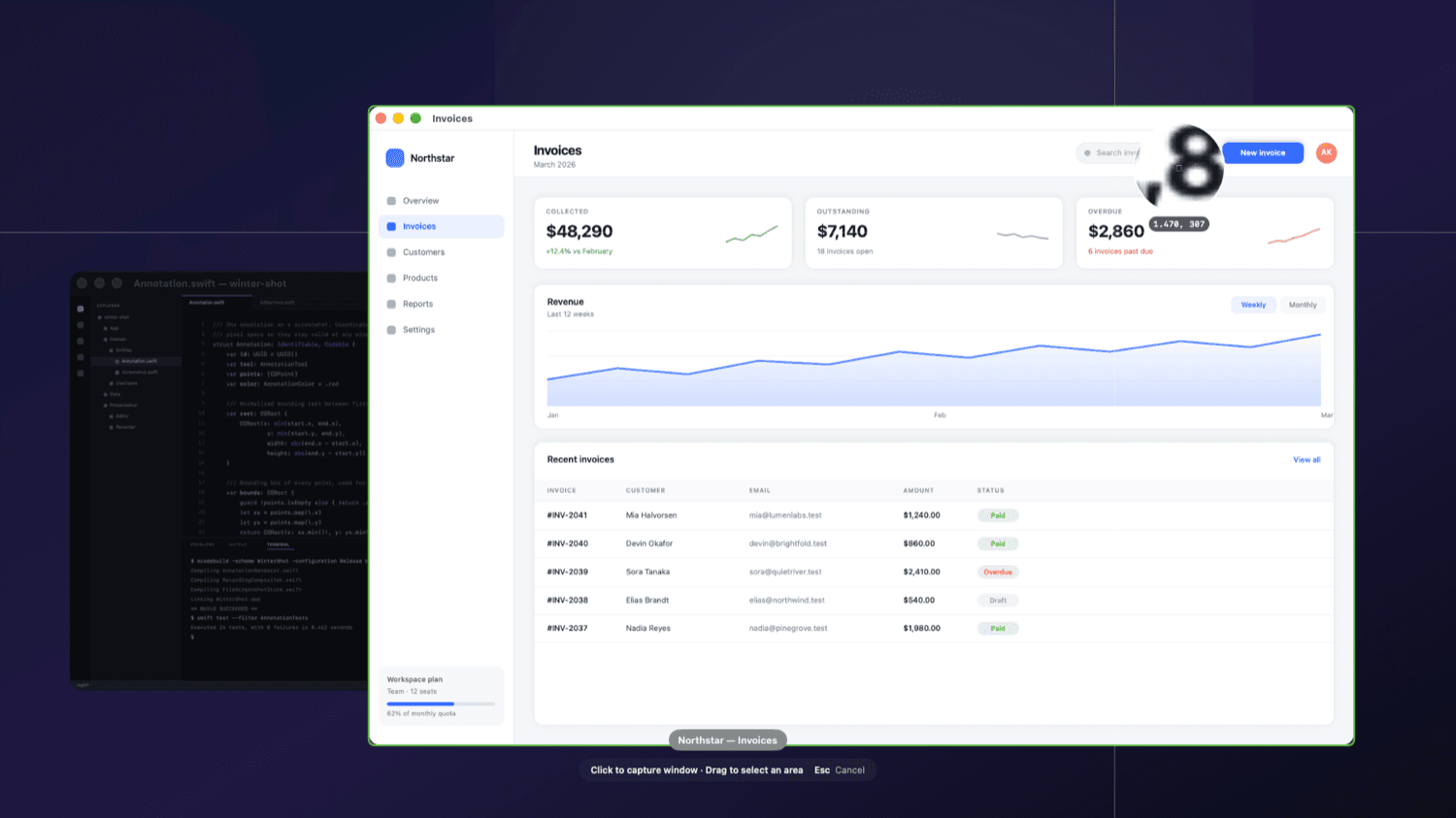
CleanShot X goes further: fullscreen, timed and — most importantly — scrolling capture in any app, plus a crosshair and magnifier for precise selection. If you regularly capture long web pages, threads or documents, that one feature decides it for CleanShot X.
Annotation: close, with different strengths
Both apps let you reopen a capture later and keep editing: CleanShot X saves editable project files, and MacScreenShot stores annotations, crop, rotation and backdrop in a .wshot.json sidecar next to the PNG, flattening pixels only on export. That makes MacScreenShot’s behavior automatic — every capture in the library stays editable without choosing a special save format.
CleanShot X has the richer toolbox: four arrow styles, spotlight, and both blur and pixelate, which it describes as randomized for security. MacScreenShot has nine tools including numbered counters, a highlighter and redaction. For documentation and bug reports that’s usually enough; for heavily styled tutorial graphics, CleanShot X gives you more control. If you’re new to this, our guide on how to annotate and redact a screenshot on Mac covers the safe way to hide private data in either app.
Screen recording: two different philosophies
CleanShot X is the more complete recorder. It captures microphone and computer audio, a camera overlay, click highlights and keystrokes, exports GIF as well as MP4, and adds a video editor with smart zooms that follow the cursor.
MacScreenShot doesn’t record audio or a camera — it doesn’t even ask for microphone access. What it does is keep the real pointer out of the video and log its motion and clicks to a sidecar, so the studio editor can add auto-zoom on every click, a smoothed synthetic cursor, wallpaper, gradient, image or looping-video backdrops, timed blur or spotlight masks, output shapes from 16:9 to 9:16, motion blur and background music. The raw recording is never modified, so you can re-export the same take with a new look as often as you like. For silent product demos and launch clips, it gets you the Screen Studio look; for narrated tutorials, it doesn’t. Our Screen Studio alternative guide goes deeper.
Sharing, privacy and accounts
CleanShot Cloud is a real advantage for teams: one-click links for screenshots and recordings, comments, password protection, link expiration and, on Pro, custom domains plus SSO and SCIM. CleanShot X’s OCR runs on-device.
MacScreenShot has no cloud at all. Captures are processed on your Mac and stored as PNG or MP4 files with JSON sidecars in its Application Support folder. Its only network activity is checking for app updates, with no telemetry, analytics or account. You share by copying or exporting — each new capture can be copied to the clipboard automatically.
Price and licensing
CleanShot Basic costs $35 once and includes a year of updates; after that you keep the app and can renew updates for $19 a year. Pro is $10 per user per month billed annually, and the app is also in Setapp. MacScreenShot is a one-time purchase, with no subscription. Its builds aren’t notarized by Apple yet, so the first launch needs a click on Open Anyway in Privacy & Security.
Who should pick which
- Support, sales and remote teams who send links all day: CleanShot X, for Cloud and team management.
- Tutorial makers who narrate or appear on camera: CleanShot X (or Screen Studio).
- Anyone who captures long pages: CleanShot X, for scrolling capture.
- Developers and writers filing bug reports and docs: MacScreenShot — window capture through overlapping windows, numbered counters, redaction and annotations you can fix later.
- Indie makers posting silent product demos: MacScreenShot’s click-to-zoom editor and vertical output shapes.
- Privacy-minded users who want no account, no cloud and one permission: MacScreenShot.
Weighing other tools too? See our roundup of CleanShot X alternatives, the full MacScreenShot feature list, or every screenshot and screen recording guide.
Sources
- cleanshot.com/features
- cleanshot.com/pricing
- MacScreenShot product page (features, requirements, price)
More on this topic: Screenshots & screen recording guides · MacScreenShot
 Screenshots & screen recording