Wispr Flow alternatives for Mac: offline and private options compared
Need a Wispr Flow alternative that works offline? We compare macOS Dictation, Superwhisper, VoiceInk, MacWhisper and MacVoice on privacy and price.
By winterzxzzUpdated 7 min read
If you want a Wispr Flow alternative because your words shouldn’t leave your Mac, you have real choices: macOS Dictation can run on device for many languages, and Superwhisper, VoiceInk, MacWhisper and our own app, MacVoice, all run speech recognition locally. If you want one because of the subscription, most of those are free or a one-time purchase. What you give up is mostly Wispr Flow’s AI polishing and its reach across Windows and phones.
We make MacVoice, so read its section with that in mind. Everything said about the other apps was checked on their own websites or GitHub pages in October 2026, and every source is linked at the end.
The short answer
- Free, already installed: macOS Dictation. Check whether your language is handled on device.
- Closest feature match that can stay offline: Superwhisper, which has local models plus AI modes.
- Open-source, local, with text cleanup: VoiceInk.
- Dictation plus file and meeting transcription: MacWhisper.
- Plain, private push-to-talk, paid once: MacVoice.
- Stay with Wispr Flow if you dictate on Windows or a phone too, or your team needs its compliance features.
What Wispr Flow gets right
Wispr Flow is popular for good reasons, and an honest roundup should start there. As listed on wisprflow.ai in October 2026:
- It edits as you talk. Filler words are dropped, and when you correct yourself mid-sentence the correction wins instead of both versions ending up in the text.
- Styles per context. Messages, team chat and email can each get their own writing style.
- It learns your vocabulary. Names and jargon are picked up automatically, and snippets expand a spoken shortcut into saved text.
- It goes everywhere. Dictation runs on Mac, Windows, iOS and Android, in 100+ languages.
- It has the paperwork for teams. Its privacy page lists SOC 2 Type II and ISO 27001 certification, and HIPAA support once a Business Associate Agreement is signed.
The free plan covers 2,000 words a week on desktop and 1,000 on mobile. Pro removes the limit for $15 per user per month, or $12 a month billed annually.
Why people look elsewhere
The trade-off sits in one line of Wispr Flow’s privacy FAQ: “Transcription always happens in the cloud to provide the best speed and accuracy.” Audio is deleted after transcription unless you turn on cloud storage, and you can opt out of model training, so the controls are sensible. But cloud-only still means three things. You can’t dictate without a connection. Your voice reaches a third party for every sentence, which some employers and clients won’t accept. And unlimited use is a subscription. If any of those is your reason for searching, the apps below are worth a look.
The options at a glance
| App | Price (as listed, October 2026) | Where speech is transcribed | Platforms | AI rewriting |
|---|---|---|---|---|
| Wispr Flow | Free up to 2,000 words/week; Pro $15/month or $12/month yearly | Cloud only | Mac, Windows, iOS, Android | Yes |
| macOS Dictation | Included with macOS | On device for supported languages, otherwise Apple’s servers | Mac | No |
| Superwhisper | Free tier; Pro monthly, yearly or lifetime | Local or cloud models, your choice | Mac, Windows, iOS, Android | Yes (modes) |
| VoiceInk | One-time, from $25 for one Mac | Local; optional cloud cleanup of text only | Mac (Apple Silicon) | Optional |
| MacWhisper | Free tier; Pro €64 one-time | Local models (Whisper, Parakeet and others) | Mac | — |
| MacVoice | One-time purchase | On your Mac, or your own API if you set one | Mac (macOS 14+, Apple Silicon) | No |
1. macOS Dictation: try this before paying for anything
Dictation is a switch in System Settings → Keyboard. Apple’s macOS Feature Availability page lists 48 languages and locales for on-device dictation in October 2026 (each one needs its speech model downloaded), out of 63 that support dictation at all. The note under the Dictation switch tells you whether your text is processed on your Mac. If it is, you already have a free, offline replacement for basic Wispr Flow use.
What you won’t get is Wispr Flow’s cleanup: no filler removal, no tone styles, no learned dictionary. Auto-punctuation covers a shorter list of 33 languages and locales. For a closer look at the trade-offs, read macOS Dictation vs Whisper.
2. Superwhisper: the most similar app that can work offline
Superwhisper covers nearly the same ground as Wispr Flow: Mac, Windows, iOS and Android, 100+ languages, custom vocabulary, and AI modes that reshape your words into a message, an email or a formal tone. The difference that matters here is that, as listed on superwhisper.com in October 2026, it works offline with local models, and its free tier already includes Whisper models. The site adds that offline models run well only on Apple Silicon, and that Intel Macs do better with its cloud models. If you rely on AI rewriting, keep in mind that a mode which sends text to a cloud language model is no longer fully local. We cover it in depth, along with its own alternatives, in our Superwhisper alternatives roundup.
3. VoiceInk: open source and local
VoiceInk transcribes on your Mac; its site says your voice data never leaves it. The GitHub README names whisper.cpp and a Parakeet implementation among its local engines, and the source is published under the GNU GPL v3. It also offers a custom dictionary, phrase replacement, and removal of filler words. Optional cloud enhancement sends only the transcribed text, not your audio.
Pricing in October 2026 is a one-time license: $25 for one Mac, $39 for two, $49 for three, with lifetime updates (a 50% off banner was showing, so regular prices may be higher). The site lists Apple Silicon as a requirement. It’s the strongest pick if you want open source and some of Wispr Flow’s tidying.
4. MacWhisper: when you also transcribe recordings
MacWhisper is primarily a transcription workstation: drop in audio or video, record Zoom, Teams or Webex calls, export the result. It also lists system-wide dictation. Files can be processed locally with models such as Whisper and Parakeet, and Pro is a €64 one-time purchase, as listed on macwhisper.com in October 2026. If meetings were the reason you used Wispr’s Notetaker, this is the local counterpart; see MacVoice vs MacWhisper for how it differs from a dictation-only app.
5. MacVoice: private push-to-talk, nothing more
MacVoice is our app. It does one job: hold your push-to-talk key in Slack, Notes, a terminal or your IDE, speak, and the text lands at your cursor. Whisper runs on your Mac through whisper.cpp. Audio is kept in memory only, never written to disk, uploaded or logged, and text dictated into secure fields is never recorded. There is no account.
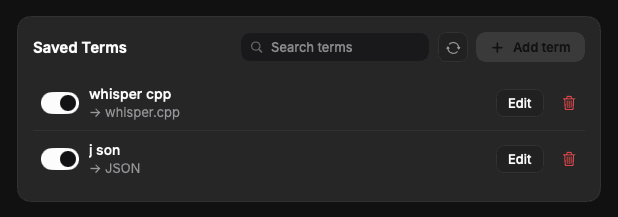
- Personal dictionary: auto-replace phrases before they’re inserted, so a name Whisper keeps mishearing is fixed once. Unlike Wispr Flow, it doesn’t learn on its own; you add entries yourself.
- Types into any app through Accessibility, with a clipboard fallback that puts your clipboard back afterwards.
- Languages: 99+ with a multilingual model from its library of 49 Whisper models, which marks how well each fits your Mac.
- Local, searchable history that stays on your Mac.
- Bring your own API if you’d rather use a server: any OpenAI-compatible
/audio/transcriptionsendpoint. - Paid once, with no subscription and no account.
Its limits are real. It needs macOS 14 or later on Apple Silicon, it asks for Microphone, Input Monitoring and Accessibility permissions, and because builds aren’t notarized yet, the first launch needs Open Anyway in Privacy & Security. It has no AI rewriting, no styles, no snippets, and no Windows or mobile version.
What you give up by leaving the cloud
It’s worth being clear-eyed before you switch. Wispr Flow’s self-correction, filler removal and tone styles come from language models running on its servers. Local apps either skip that (macOS Dictation, MacVoice), offer lighter cleanup (VoiceInk), or send text to a cloud model when you turn it on (Superwhisper’s AI modes, VoiceInk’s cloud enhancement). You also lose one account that follows you from Mac to phone to Windows PC, and the compliance documents an IT department may ask for. In return you get dictation that works on a plane, costs nothing per word, and keeps audio off anyone else’s servers.
Who should pick which
- You mostly send short messages in a supported language: macOS Dictation, on device.
- You want Wispr-style modes but need an offline fallback: Superwhisper.
- You want open source with filler removal: VoiceInk.
- You transcribe interviews or meetings as well: MacWhisper.
- You want a fast, private key for typing and AI prompts: MacVoice. Our guide to dictating prompts into Claude Code and Cursor shows the workflow, and offline voice to text on Mac explains how to check that nothing leaves your machine.
- You dictate on Windows or your phone too: Wispr Flow or Superwhisper.
More guides are in the voice dictation category, and the full feature list is on the MacVoice page.
Sources
- wisprflow.ai (auto-edits, filler removal, styles, dictionary, snippets, platforms, languages)
- wisprflow.ai/pricing (plans, prices, weekly word limits)
- wisprflow.ai/privacy (cloud transcription, audio deletion, training opt-out, SOC 2 Type II, ISO 27001, HIPAA)
- Apple: macOS Feature Availability (dictation, on-device dictation and auto-punctuation languages)
- Apple Support: Use Dictation on Mac
- superwhisper.com (platforms, plans, offline models, modes, Intel Macs)
- tryvoiceink.com (local transcription, pricing, features, requirements)
- VoiceInk on GitHub (license, local engines)
- macwhisper.com (dictation, local models, pricing)
- MacVoice product page (features, requirements, price)
More on this topic: Voice dictation guides · MacVoice
 Voice dictation