macOS Dictation vs Whisper: accuracy, privacy and when each one is enough
macOS Dictation vs Whisper on accuracy, on-device privacy, languages and setup, with a simple test you can run yourself and when Apple Dictation is enough.
By winterzxzzUpdated 7 min read
macOS Dictation is built into every Mac, needs no setup and, for many languages, runs on device. Whisper is an open-source speech model from OpenAI that dictation apps run on your Mac, giving you a choice of model size, a consistent offline mode and more control over vocabulary. For quick messages in a supported language, Apple’s Dictation is often enough. Whisper earns its place when you need predictable privacy, a language Apple doesn’t handle on device, or a lot of technical words.
We make MacVoice, a Whisper dictation app, so we have a stake in this question. Apple and OpenAI facts below come from their own documentation as of October 2026, and both are linked at the end. Neither side publishes a head-to-head accuracy test, so we won’t invent one; instead, there’s a test you can run yourself.
The short answer
- Apple Dictation wins on convenience: nothing to install, works in every text field, handles voice commands for punctuation and line breaks.
- Whisper wins on control: you pick the model, it runs on your Mac every time, and apps built on it can add dictionaries and push-to-talk keys.
- On accuracy, it depends on your language, your vocabulary and, for Whisper, the model size. Test with your own words.
Two different kinds of thing
The comparison is a little lopsided, and it helps to see why. macOS Dictation is a system feature: a shortcut, a microphone indicator and Apple’s speech recognition, either on your Mac or on Apple’s servers. You can’t swap its model or see how it was trained.
Whisper is a model, not an app. OpenAI describes it as a general-purpose speech recognition model, and its paper reports training on 680,000 hours of multilingual audio collected from the web. The code and weights are released under the MIT License, and many Mac apps build on it, often through the whisper.cpp port. When people say “Whisper dictation,” they mean one of those apps running a Whisper model locally.
Side by side
| macOS Dictation | Whisper in a local app | |
|---|---|---|
| Cost | Included with macOS | Model is free; apps range from free to paid |
| Where it runs | On device for supported languages, otherwise Apple’s servers | On your Mac, once the model is downloaded |
| Languages (October 2026) | 63 languages and locales; 48 on device | 100 language codes in Whisper’s tokenizer; quality varies |
| Choice of model | None | Tiny to Large, English-only or multilingual |
| Auto-punctuation | Yes, in 33 languages and locales | Depends on the app |
| Voice commands | Yes (“new line”, punctuation names, emoji) | Depends on the app |
| Custom vocabulary | Not documented by Apple | Depends on the app |
| Setup | One switch in System Settings | Install an app, download a model, grant permissions |
Accuracy: what is actually documented
Apple doesn’t publish error rates for Dictation. Its help page describes how it handles uncertainty: words it isn’t sure about are underlined in blue, and you click one to pick an alternative. Apple’s privacy page adds that personalized speech recognition happens on your device.
For Whisper, the paper’s abstract says the models approach human accuracy and robustness, and that they work on standard benchmarks without fine-tuning. The README is more cautious in a useful way: Whisper’s performance “varies widely depending on the language,” and it publishes per-language error charts for Large-v2 and Large-v3. Two more notes from the README matter for dictation:
- English-only models (
tiny.en,base.en,small.en,medium.en) tend to do better than their multilingual twins, most clearly at the smallest sizes. - Size is a trade. OpenAI lists Tiny at 39 million parameters and roughly ten times the speed of Large (1.55 billion parameters), measured on a data-center GPU. Turbo, an optimized Large-v3, gives up a little accuracy for much more speed.
Run your own five-minute test
Published charts are measured on other people’s recordings, not your vocabulary, so test with your own words:
- Write a short paragraph full of what you actually say: colleagues’ names, product names, commands, jargon.
- Open a blank note, start macOS Dictation and read the paragraph at your normal pace.
- Repeat in the same note with a Whisper app, using the model you would really use day to day.
- Count the words each one got wrong, and note which mistakes come back every time.
Repeating mistakes are the important ones. A Whisper app with a replacement dictionary can fix them permanently; Dictation’s blue underline helps you fix them one at a time.
Privacy: “sometimes on device” vs “always on device”
Apple’s documentation is honest about the condition. Your Mac shows, under the Dictation switch in Keyboard settings, whether dictation is processed on device; if not, what you say is sent to Apple’s servers. On-device support covers 48 languages and locales on Apple’s availability page in October 2026, and each needs its speech model downloaded. Audio isn’t stored unless you opt in to Improve Siri and Dictation, and request history is tied to a random identifier that rotates several times an hour. Apple says it may keep that data for up to two years.
A Whisper app running locally takes the question off the table: once the model file is on your disk, transcription needs no connection. The caveat is the app around it. Check whether it keeps audio, whether it has an account, and whether any AI features call a server. Our guide to offline voice to text on Mac has a checklist and the Wi-Fi-off test.
Languages
Apple’s list is long but split three ways: 63 languages and locales for Dictation, 48 that run on device, and 33 with automatic punctuation. Whisper’s tokenizer lists 100 language codes, though, as its README notes, quality varies widely from language to language, and only the multilingual models handle anything but English. If you speak a language that’s on Apple’s Dictation list but not the on-device one, a local Whisper model is a way to keep it on your Mac, if Whisper covers it well. Switching languages in Dictation is quick: pick another from the indicator next to the cursor, or press the Globe key.
Setup and day-to-day use
Dictation takes seconds: System Settings → Keyboard → Dictation, then press the Microphone key, use the Dictation shortcut or choose Edit → Start Dictation. It stops on its own after 30 seconds of silence. One catch from Apple’s help page: with Voice Control turned on, regular Dictation is unavailable.
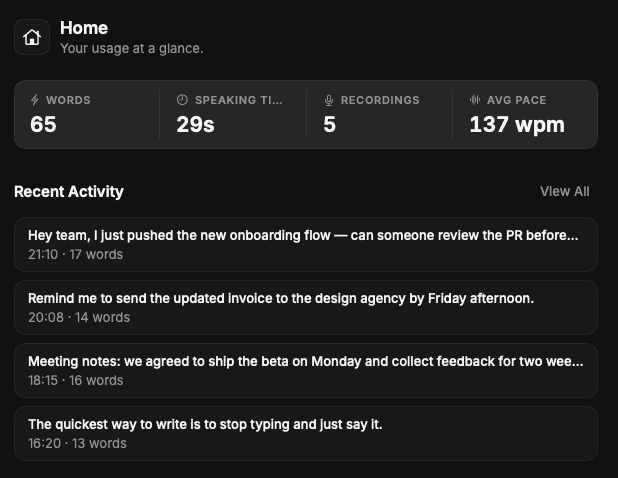
A Whisper app asks more of you up front. Taking MacVoice, our app, as the example: it needs macOS 14 or later on Apple Silicon, three permissions (Microphone, Input Monitoring and Accessibility), and a model download. Because builds aren’t notarized yet, the first launch needs Open Anyway in Privacy & Security. After that, you hold your push-to-talk key in any app, speak, and the text lands at your cursor.
When Apple Dictation is enough
- Your language appears in the on-device list, and Keyboard settings confirm on-device processing.
- You dictate messages, notes and emails in everyday language, not code or jargon.
- You like saying punctuation and line breaks out loud, or adding emoji by name.
- You’d rather not install anything or grant extra permissions.
When Whisper is worth it
- You need every dictation to stay on your Mac, regardless of language or settings.
- You keep correcting the same names and terms and want a dictionary to fix them once.
- You want a hold-to-talk key rather than start and stop shortcuts.
- You dictate long prompts into AI tools; see dictating prompts into Claude Code and Cursor.
MacVoice is built for that second list: on-device Whisper, audio kept in memory only, a personal dictionary for replacements, local searchable history and no account. Its Models page offers 49 Whisper models, English-only and multilingual for 99+ languages, and marks which ones fit your Mac. It is a one-time purchase, with no subscription.
Looking at other Whisper apps? Compare MacVoice and MacWhisper, or see the wider field in offline and private Wispr Flow alternatives and Superwhisper alternatives. More guides are in the voice dictation category, and everything MacVoice does is on its product page.
Sources
- Apple Support: Use Dictation on Mac (setup, shortcuts, auto-punctuation, blue underlines, languages, 30-second stop, Voice Control)
- Apple: macOS Feature Availability (Dictation, on-device and auto-punctuation language lists)
- Apple: Ask Siri, Dictation & Privacy (on-device indicator, audio storage, identifier, retention, personalized recognition)
- OpenAI Whisper README (model sizes, English-only models, Turbo, per-language performance, MIT License)
- Whisper tokenizer.py (language list)
- Radford et al., “Robust Speech Recognition via Large-Scale Weak Supervision” (training data, accuracy and robustness)
- MacVoice product page (features, requirements, price)
More on this topic: Voice dictation guides · MacVoice
 Voice dictation