Which Whisper model should you use on a Mac? Tiny to Large-v3 Turbo
How to pick a Whisper model on a Mac: sizes, memory, speed and accuracy from tiny to large-v3 turbo, English-only vs multilingual, and quantized builds.
By winterzxzzUpdated 4 min read
For dictation on an Apple Silicon Mac, start with an English-only small model if you speak English, and with large-v3-turbo (or a quantized build of it) if you speak anything else. Go smaller only if transcripts arrive too slowly, and bigger only if the model keeps mishearing you. The rest of this guide explains why, using the numbers OpenAI and the whisper.cpp project publish, as read in October 2026. We make MacVoice, a dictation app that runs these models on your Mac, and we’ll show where it fits at the end.
The models, side by side
Whisper comes in six sizes. The parameter counts and relative speeds below are from OpenAI’s README, where speed was measured on an NVIDIA A100 GPU transcribing English, so treat it as a ranking rather than a Mac benchmark. The disk sizes are the ggml files whisper.cpp distributes, the format whisper.cpp-based Mac apps load.
| Model | Parameters | English-only version | Disk (ggml) | Relative speed |
|---|---|---|---|---|
| tiny | 39 M | tiny.en | 75 MiB | ~10× |
| base | 74 M | base.en | 142 MiB | ~7× |
| small | 244 M | small.en | 466 MiB | ~4× |
| medium | 769 M | medium.en | 1.5 GiB | ~2× |
| large (v1, v2, v3) | 1,550 M | — | 2.9 GiB | 1× |
| large-v3-turbo | 809 M | — | 1.5 GiB | ~8× |
On memory, whisper.cpp lists roughly 273 MB for tiny, 388 MB for base, 852 MB for small, 2.1 GB for medium and 3.9 GB for large while running. Check what your Mac has free in Activity Monitor before you pick one of the bigger models.
English-only or multilingual?
Every size except large and turbo has an English-only variant with .en in its name. OpenAI notes that the English-only models tend to do better for English, especially tiny.en and base.en, and that the gap gets smaller at small.en and medium.en. So if you only ever dictate in English, pick the .en version of whatever size you choose.
For any other language, you need a multilingual model, and size matters more. OpenAI says plainly that Whisper’s accuracy varies widely by language, and its README links a per-language error-rate chart for large-v3 and large-v2. Look your language up there before you settle on a small model.
What turbo is, and when not to use it
large-v3-turbo is an optimized version of large-v3. OpenAI’s README puts its accuracy cost as small, and lists it at about eight times the speed of large with roughly half the parameters. For dictation in languages other than English it’s the natural default.
The one catch: turbo was not trained for translation. If you want to speak another language and get English text back, OpenAI recommends medium or large instead. For plain transcription in the language you speak, turbo is fine.
Quantized models: same model, smaller file
whisper.cpp supports integer quantization, which stores the weights with fewer bits. The project’s README notes that the smaller files also cut memory use and, on some hardware, speed things up. The difference is large: large-v3 drops from 2.9 GiB to 1.1 GiB as large-v3-q5_0, and large-v3-turbo from 1.5 GiB to 547 MiB as large-v3-turbo-q5_0. That makes the big multilingual models practical on Macs with less memory. Quantizing trades a little precision for size, so if a quantized build mishears words the full one handles, step back up.
Why Apple Silicon handles this well
whisper.cpp calls Apple Silicon a first-class platform. It uses ARM NEON, the Accelerate framework and Metal, so inference runs on the GPU, and it can run the encoder on the Neural Engine through Core ML, which its README says can be more than three times faster than CPU-only. These are capabilities of the whisper.cpp project; how much of them a given app enables is up to that app.
A simple way to choose
- English, short messages and prompts: small.en. Drop to base.en if you want faster results.
- English with lots of names and jargon: small.en or medium.en, plus a personal dictionary that fixes the words it still gets wrong.
- Any other language: large-v3-turbo; the q5_0 build if memory is tight. If even that is too slow, step down to small and accept more mistakes.
- Speaking one language, writing in English: medium or large, not turbo.
The real test is your own voice. Dictate the same paragraph with two models and keep the one that makes fewer mistakes at a speed you can live with.
Running these models in MacVoice
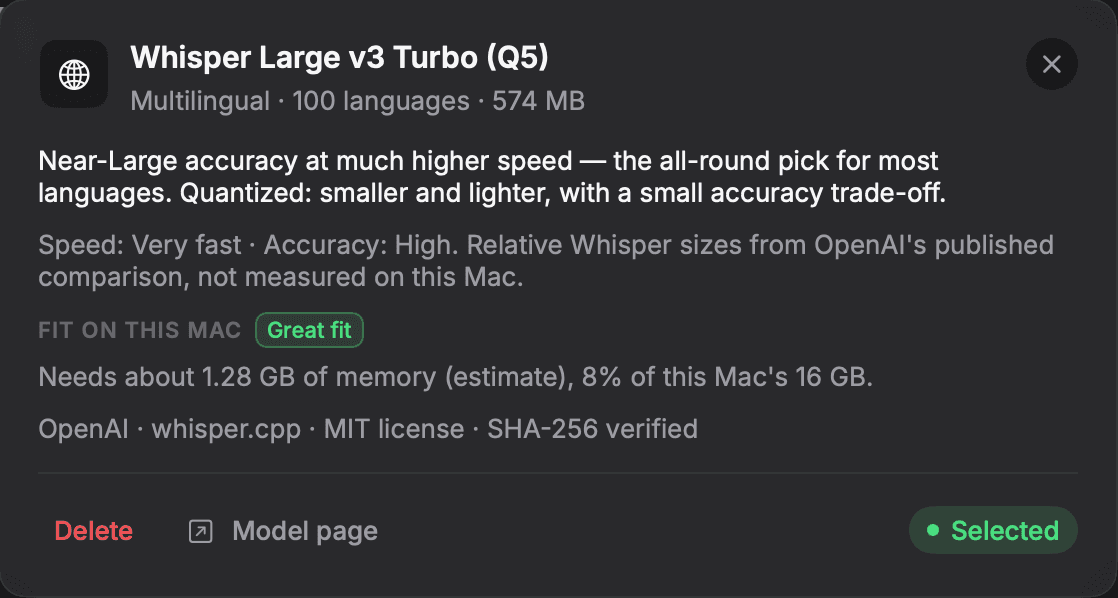
MacVoice is our push-to-talk dictation app. Hold a key in any app, speak, release, and the text is typed at your cursor, with Whisper running on your Mac through whisper.cpp. Every model in this guide is in its Models page, a library of 49 models you can download from inside the app: all 33 official whisper.cpp builds, from tiny to large-v3 turbo, English-only and multilingual, full precision and Q5/Q8 quantized, plus 16 language-tuned or distilled models published by their own authors, such as Distil-Whisper for English and Kotoba-Whisper for Japanese.
The Models page also does the sizing work above for you. It reads your Mac’s memory, chip and free disk space on the device and marks each model a great, good or tight fit, with a recommendation for English and one for other languages. Those are estimates from the model’s size, not benchmarks, so the two-model test above still has the last word. Every download is checked against its published SHA-256 checksum, and any other ggml Whisper file, a fine-tune for example, can still be imported.
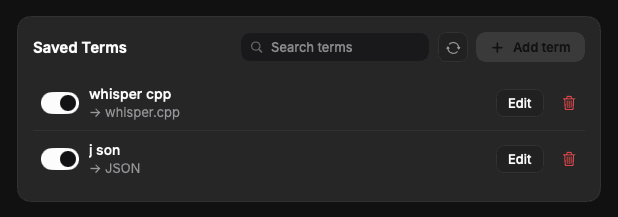
The personal dictionary makes a smaller, faster model good enough more often: it auto-replaces phrases before insertion, so a name the model keeps mishearing only needs fixing once. A local history lets you search what you dictated. Audio stays in memory and is never written to disk.
For more on what “offline” should mean, read offline voice to text on Mac, and if you’re weighing Apple’s built-in option, see macOS Dictation vs Whisper. All our dictation guides are in the voice dictation category, and the full feature list is on the MacVoice page.
Sources
- OpenAI Whisper README, “Available models and languages”: github.com/openai/whisper
- whisper.cpp README (Apple Silicon support, memory usage, quantization, Core ML): github.com/ggml-org/whisper.cpp
- whisper.cpp model list (ggml file sizes, quantized builds): github.com/ggml-org/whisper.cpp/tree/master/models
- MacVoice product page (models, languages, dictionary, privacy)
More on this topic: Voice dictation guides · MacVoice
 Voice dictation